Track medication doses. No accounts.
Never lose track of a dose.
Track medications for yourself or the people you care for. Log a dose with one tap and Next Dose works out what’s due and when — private by default, encrypted end to end.
Free · works offline · installs like an app · nothing to sign up for.
What it does
Made for keeping people safe
-
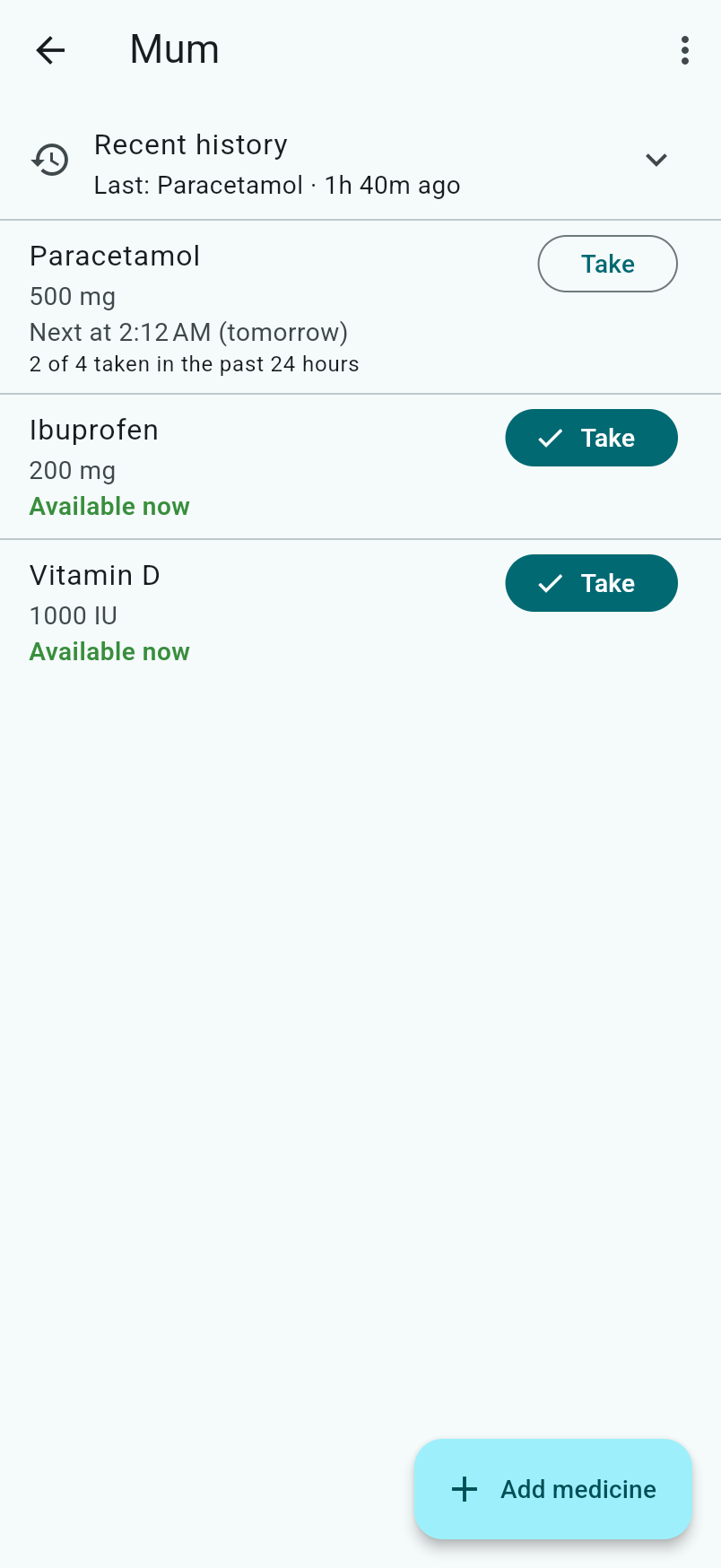
Take now, in one tap
Log a dose the moment you give it. The dose history is the source of truth, so “what’s next” is always calculated, never guessed.
-
Everyone you care for
Track yourself, a partner, kids or ageing parents. Each person is their own private space you can keep solo or share.
-
Intervals & period caps
Set a minimum interval and a max per period. Next Dose shows what’s safe to take now and what’s still on cooldown.
-
Share with a carer
Invite a partner or carer to a person by scanning a QR code. Both devices stay in sync, live.
-
Reuse medicines
Copy a medicine’s definition from one person to another — set it up once, use it everywhere.
-
You decide who’s in
The person who sets someone up owns their space — add a carer, share ownership, or remove access. Remove someone and the space re-keys itself, so they see nothing new.
-
All your devices
Set up a new phone or tablet by scanning a code or entering your phrase. Changes made offline catch up automatically the moment you reconnect.
-
Private by design
No account, no email, no password. Everything is encrypted on your device before it syncs, and it works offline.
How it works
Encrypted, without accounts
- 1
One recovery phrase
On first use, Next Dose generates a 24-word recovery phrase. Those words are your identity — there's no account, username, or password behind them.
- 2
The phrase unlocks your keystore
The phrase derives a master key that encrypts a small personal keystore — the list of shared spaces you belong to and the key for each.
- 3
Each shared space has its own key
A person you track has one group key. Everything in it is stored as documents encrypted with that key. Sharing the space means sharing that one key — via a QR code or invite — and the space's owners decide who's in. Remove someone and the key is rotated and re-shared to everyone who remains, so they see nothing new.
- 4
A blind server just relays ciphertext
Your devices sync through a server that stores and forwards encrypted blobs and pushes live updates. It never holds a key, so it cannot read anything it syncs.
Security
Even the sync server can’t read it
- One recovery phrase 24 BIP39 words derives your master key
- Master key encrypts your keystore the list of spaces you belong to
- Group key encrypts one space's documents every dose, encrypted
Stores & relays encrypted blobs. Fans out live updates. Cannot decrypt anything.
Why it’s different
Private by design
-
End-to-end encrypted
Encryption and decryption happen only on your devices. Plaintext never leaves the device.
-
The server is blind
It's untrusted infrastructure by design: it stores and relays ciphertext and never holds a key. Compromising the server leaks nothing readable.
-
No accounts, nothing to breach
No email, no password, no profile. There's no user database to leak — just anonymous encrypted blobs keyed by hashes.
-
Open source
The apps, the encryption core, and the server are all public. Inspect the crypto or self-host the server — you don't have to take our word for it.
-
Standard, modern crypto
libsodium primitives (XChaCha20-Poly1305, BLAKE2b) and BIP39 phrases. No custom cryptography.
-
Works offline
A PWA with a local encrypted cache — it works without a connection and syncs when it's back.
The Mycelium
One private foundation, a family of apps
The Mycelium is a small family of apps that all share the same promise — no accounts, end-to-end encrypted, and open source. Set up once and the same private identity works across every one of them.
 Next Dose You’re here Track medication doses for yourself or the people you care for.
  Tally Stick Split shared expenses for trips, housemates or couples. Visit Tally Stick →
  Stock Level Know how many days of anything you have left — feed, cereal, kibble. Visit Stock Level →
  Family Manager One shared calendar and to-do list for everyone at home. Visit Family Manager →
  Rep Sheet Log workouts — treadmill, weights, plank, pilates — and watch them add up. Visit Rep Sheet →
  The MyceliumAll 5 in one app
Don’t want five icons on your home screen? The Mycelium is every
app above in a single install, sharing one recovery phrase — named for the
fungal network that links separate trees underground and lets them share.
Visit themycelium.au →
The MyceliumAll 5 in one app
Don’t want five icons on your home screen? The Mycelium is every
app above in a single install, sharing one recovery phrase — named for the
fungal network that links separate trees underground and lets them share.
Visit themycelium.au → Start using Next Dose
No sign-up, no email, no password. Open it and go — your data is encrypted before it leaves your device.